
The best WordPress AI plugin depends on how many sites you run, because most plugins are installed once per site and billed once per site. For one blog, an in-dashboard writing assistant is fine. For five, ten or fifty sites, an external client that connects Claude or ChatGPT to all of them through one install is cheaper and far less tedious to maintain.
TL;DR:
- A "WordPress AI plugin" is really three different things: in-editor assistants, SEO plugins with AI features, and external clients that drive your sites from outside.
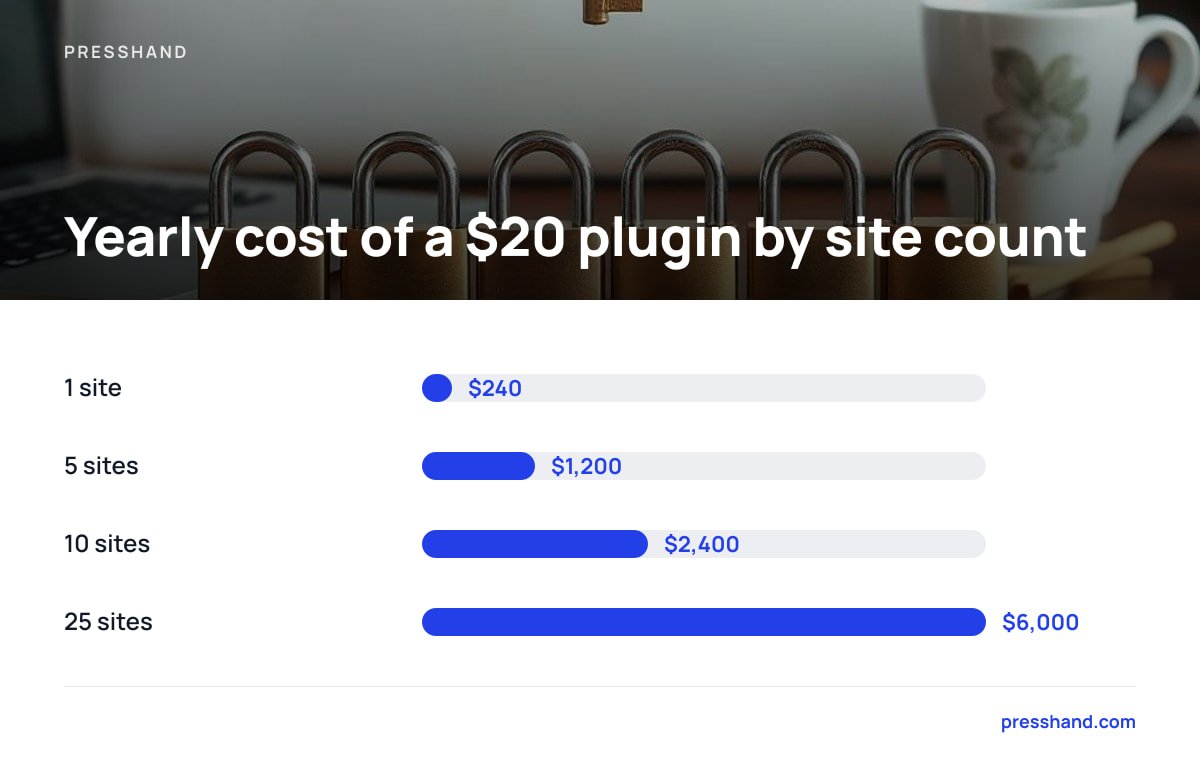
- Per-site pricing is the hidden cost. A $20 monthly plugin across 10 sites is $2,400 a year; the same fee across one site is a rounding error.
- Free plugins are genuinely useful for single sites, but you usually pay with your own API key, usage caps, or both.
- Every plugin you add to a client site is code you must update and answer for; fewer installs means fewer breakages.
- If you manage several sites, pick the tool that connects once and works on all of them, then check what it does to your SEO plugin's data.
Table of Contents
- The Three Kinds of WordPress AI Plugin, and Why They Aren't Interchangeable
- What Free WordPress AI Plugins Actually Cost You
- Per-Site Pricing Is the Number Nobody Puts in the Headline
- Where the Obvious Answer Is Wrong: Install on Every Site
- How to Choose a WordPress AI Plugin: Five Tests Before You Pay
- AI Writing Is the Easy Part: What to Do About SEO Scores
- Security and Privacy Before You Connect Anything
- Our Pick for Agencies: Get a WordPress AI Plugin Setup That Doesn't Bill Per Site
- Frequently Asked Questions
- Sources
The Three Kinds of WordPress AI Plugin, and Why They Aren't Interchangeable
Search "wordpress ai plugin" and you get one long list that treats very different products as rivals. They aren't. They sit in three camps, and the camp matters more than the brand.
- In-editor assistants. These live inside the block editor or classic editor. You highlight a paragraph, click a button, and get a rewrite, a summary or a draft. Good for writers, limited for anyone doing admin.
- SEO plugins with AI bolted on. Titles, meta descriptions and schema suggestions arrive inside a plugin you probably already run. Useful, but the AI is a feature, not the product.
- External clients. Software that sits outside WordPress and talks to your sites through an API. You describe a job in plain English, and it does the clicking for you.
The first two are installed on each site and configured on each site. The third is installed once. That single difference decides most of what follows.
What Free WordPress AI Plugins Actually Cost You
Free plugins are real, and for a single hobby site they are often the right call. The catch is where the cost moves to.
Most free tiers do one of three things. They cap monthly generations, they ask you to paste in your own API key (so you pay the model provider per use), or they hold back the useful features, such as bulk edits, for a paid tier. None of that is sinister. It's just not free.
The other cost is attention. Each plugin needs updating, and each update is a small chance something breaks on a live site. If you've ever wondered why a site slowed down after "just one more plugin", our guide on how to manage WordPress plugins without breaking your sites covers the routine we'd follow.
Per-Site Pricing Is the Number Nobody Puts in the Headline

Here is the arithmetic competitors tend to skip. Take a typical paid AI plugin at $20 a month per site and multiply it out.
| Sites you manage | Monthly cost at $20/site | Yearly cost |
|---|---|---|
| 1 | $20 | $240 |
| 5 | $100 | $1,200 |
| 10 | $200 | $2,400 |
| 25 | $500 | $6,000 |
Plenty of plans are cheaper than $20, and some are dearer, so treat the table as a template, not a quote. Put your own site count into it before you compare anything else.
Ten sites at $20 a month is $2,400 a year, every year, for a tool that does the same job on each one.
Agencies feel this hardest, because client sites come and go and every new one adds a line to the bill. Reselling is the other trap: if the plugin's licence forbids rebranding, you can't fold it into a client package at all.
Where the Obvious Answer Is Wrong: Install on Every Site
The obvious advice is to install the best-reviewed plugin everywhere. For one site, fine. For a portfolio, it's usually the wrong move, for three reasons.
- Maintenance multiplies. Ten installs means ten update queues, ten sets of settings, and ten places for a conflict to appear.
- Settings drift. The tone you configured on site one is not the tone on site seven, because you forgot.
- Client risk. Every plugin you add to a client's site is something you now answer for if it misbehaves.
An external client sidesteps all three. Nothing new runs on the site's own server for most jobs, so there's nothing to conflict with your theme or your caching layer. If you want the technical background on how that connection works, our piece on setting up an MCP server explains local versus remote, and MCP server setup: what actually breaks lists the failure points.
How to Choose a WordPress AI Plugin: Five Tests Before You Pay

Run any candidate through these before you hand over a card number.
- Count the sites. If the price scales per site and you run more than three, do the table above.
- Check what it can do beyond writing. Drafting text is the easy part. Can it fix menus, swap images, edit CSS, moderate comments? That's where hours disappear.
- Ask what happens to your SEO plugin. A tool that writes meta descriptions but ignores Yoast, Rank Math, All in One SEO or SEOPress will leave you reconciling two sources of truth.
- Read the licence for resale. If you're an agency, "personal use only" ends the conversation.
- Find the exit. What happens to your content and settings if you stop paying? Subscriptions that disable features on cancellation are a lock-in, however friendly the pricing page.
Pro Tip: Test any AI plugin on a staging copy of your messiest client site, not your tidiest one. A tool that behaves on a clean install tells you nothing; one that survives a site with 14 plugins, a page builder and a decade of old posts tells you a lot.
AI Writing Is the Easy Part: What to Do About SEO Scores
Generating a 1,500-word post takes seconds on any of these tools. The harder question is whether the post is any good for search, and most plugins don't know, because they never look at the live page.
A useful check scores the published page, not the draft in the editor, since themes, widgets and caching change what the crawler actually sees. If you're curious what automated checks catch and what they quietly skip, our breakdown of what an AI SEO audit checks and misses is worth ten minutes.
Google's own position is worth knowing here. Its Search Central guidance on AI-generated content says the method of production isn't the issue; producing content mainly to manipulate rankings is. In practice that means AI drafts need a human who checks facts and adds something the model couldn't, like your own numbers or client examples.
Security and Privacy Before You Connect Anything

Giving any tool write access to a WordPress site deserves a moment's thought. Check three things:
- Where credentials live. Software running on your own machine or server keeps application passwords with you, rather than in a vendor's database.
- What permissions it needs. Create a dedicated WordPress user with only the role the job requires, rather than reusing an administrator login.
- Data handling. Know whether your content is sent to a third party and under what terms. The OWASP Top 10 remains a sensible baseline for thinking about what a connected tool can expose.
For shops, tighter scoping matters more still; see WooCommerce MCP: what it does and what to lock down.
Our Pick for Agencies: Get a WordPress AI Plugin Setup That Doesn't Bill Per Site
If you run several sites, our pick is the external-client route, and we'd say so even if we didn't sell one. Per-site fees punish exactly the people growing a portfolio. If you're still deciding which category of tool you need, pick WordPress management tools by job, not feature list.
Presshand is a WordPress MCP client that runs on your own machine or server and connects Claude or ChatGPT to every site you own. It handles 83 jobs, from posts, pages, images and menus to plugins, CSS and comments, and scores live pages out of 100 while working with Yoast, Rank Math, All in One SEO and SEOPress. The licence is $97 once for every site you own. The Agency licence is $197 and adds rebrand and resell rights. There are no per-site fees and no monthly caps.
The honest caveat: you still need your own Claude or ChatGPT subscription, and yearly updates cost $49 a year after the first 12 months (optional, but you'd miss new features). It also isn't a drag-and-drop writing widget inside the editor, so if you only run one blog and want a rewrite button, a free in-editor plugin will serve you better.
Frequently Asked Questions
What is the best free WordPress AI plugin?
It depends on the job. For occasional rewrites on a single site, an in-editor assistant with a free tier is fine, though you'll hit generation caps or need your own API key. If you manage several sites, free per-site plugins get tedious fast because each one needs separate setup and updates.
Are WordPress AI plugins safe to use on client sites?
They can be, if you scope permissions tightly. Create a dedicated user with the minimum role needed, avoid reusing administrator credentials, and test on a staging copy first. Also check where your content is sent, since some plugins pass it through the vendor's servers.
Will AI-written content hurt my Google rankings?
Google's guidance says it focuses on content quality, not how the content was made, and warns against producing material mainly to manipulate rankings. AI drafts that are fact-checked and add original detail are treated like any other content. Unedited bulk output is where sites get into trouble.
Do I need a plugin installed on every site to use AI with WordPress?
Not necessarily. Some tools sit outside WordPress and connect to your sites through its API, so there is little or nothing to install on each site. That cuts update work and avoids conflicts with themes and caching plugins.
Can agencies resell a WordPress AI plugin to clients?
Only if the licence allows it. Many plugins restrict use to your own sites, so read the terms before building the tool into a client package. Some products offer a separate agency licence with rebrand and resale rights.
Sources
- Using generative AI content on your website | Google Search Central
- OWASP Top Ten | OWASP Foundation
- Application Passwords Integration Guide | WordPress.org Developer Resources
- Model Context Protocol | Model Context Protocol project