
ChatGPT vs Claude comes down to one practical difference for anyone running a WordPress site: ChatGPT is the better all-rounder for quick content, plugin troubleshooting and general research, while Claude tends to write longer, more structured text with less editing afterward and holds far more context in a single conversation. Pick ChatGPT if you want speed and a wider ecosystem of tools. Pick Claude if you're pasting in a 6,000-word draft or a tangled stylesheet and want it handled in one pass.
TL;DR:
- ChatGPT's wider toolset and plugin ecosystem suit quick content and general troubleshooting better than long, structured writing.
- Claude's larger context window handles a full blog post, a style guide, and an old draft in one conversation without truncation.
- Both main paid tiers cost $20/month, so the real difference is output quality for your task, not subscription price.
- Claude writes more consistently structured long-form copy; ChatGPT edits faster in short back-and-forth turns.
- For actually running WordPress sites, the connecting tool matters more than which model you pick — Presshand works with either.
Table of Contents
- Where the Two Models Actually Differ Once You Get Past the Hype
- Writing Long-Form Posts: Who Needs Less Editing Afterward
- Context Windows: Why It Matters When You're Pasting In a Whole Page
- Coding and Debugging: Fixing a Broken Plugin or a Tangled Stylesheet
- Pricing Compared: ChatGPT vs Claude on a $20 Budget
- Data Privacy: What Happens to the Draft You Paste In
- Connecting Either Model to WordPress: Why the Tool Matters More Than the Model
- Run Both Models on Every Site You Own, Without Per-Site Fees
- Frequently Asked Questions
- Sources
Where the Two Models Actually Differ Once You Get Past the Hype
Both models can draft a blog post, summarize a plugin changelog, or explain why your site is loading slowly. The gap shows up in what happens next. ChatGPT sits inside a bigger ecosystem — custom GPTs, a long list of third-party integrations, image generation, voice mode — which makes it the more flexible tool if your workflow spans beyond just WordPress. Claude has leaned harder into one thing: handling large amounts of text and code in a single pass without losing track of earlier instructions.
Neither company markets it this way, but that's the honest split. If your week is a mix of emails, spreadsheets, a bit of research and the occasional blog post, ChatGPT's breadth earns its keep. If your week is three client sites' worth of draft posts, meta descriptions and CSS tweaks, Claude's patience with long documents starts to matter more than any single feature.
Writing Long-Form Posts: Who Needs Less Editing Afterward

Ask both models to write a 1,500-word guide and you'll get two readable drafts. The difference is in what you do after. Claude tends to hold a consistent structure across a long piece — headers stay parallel, the argument doesn't drift, and it's less likely to repeat a point it made three paragraphs earlier. ChatGPT writes fast and conversationally, which is great for a quick post or an email, but on anything past 1,000 words it's more prone to looping back on itself or padding a section that didn't need padding.
This isn't a universal law — model updates shift behavior every few months, and a good prompt closes most of the gap either way. But if you're measuring by "how much do I need to rewrite before this goes live," Claude usually wins on anything long enough to need an outline.
Pro Tip: Don't test these models by asking for a full draft. Test them by asking each to rewrite a single meta description for a post that already exists, within a strict 155-character limit. That one task reveals whether a model respects a hard constraint or quietly ignores it and writes something 40 characters too long — which is exactly the kind of mistake that slips past you when you're skimming a long article.
Context Windows: Why It Matters When You're Pasting In a Whole Page

A context window is how much text a model can hold in one conversation before it starts forgetting the start. This sounds abstract until you try to paste in a 4,000-word draft, your site's style guide, and three old posts you want it to match tone with — and the model starts losing the thread halfway through.
Claude's paid tiers can hold roughly 200,000 tokens in a single conversation — close to 150,000 words, or a short novel's worth of text.
That headroom is why Claude is the better pick for anything that involves feeding in a lot of existing material: a full page audit, a batch of old posts you want rewritten in a consistent voice, or a large stylesheet you want cleaned up without splitting it into chunks. ChatGPT's paid tier also offers a large context window, but Claude's has consistently been the one built around this specific strength, as Anthropic describes in its own plan comparisons.
Coding and Debugging: Fixing a Broken Plugin or a Tangled Stylesheet
Both models write PHP and CSS well enough to fix the kind of small, specific problem a non-developer runs into: a plugin conflict throwing a fatal error, a menu that won't collapse on mobile, a shortcode that broke after an update. ChatGPT has the edge in raw ecosystem support — more trained examples of WordPress-specific code, more community troubleshooting baked into its training. Claude is stronger when the fix requires understanding a long chain of dependencies at once, such as tracing why a child theme's custom function stopped firing after a parent theme update touched three files.
For a one-off fix, either will get you there. For debugging something that spans multiple files, Claude's context advantage shows up again.
Pricing Compared: ChatGPT vs Claude on a $20 Budget
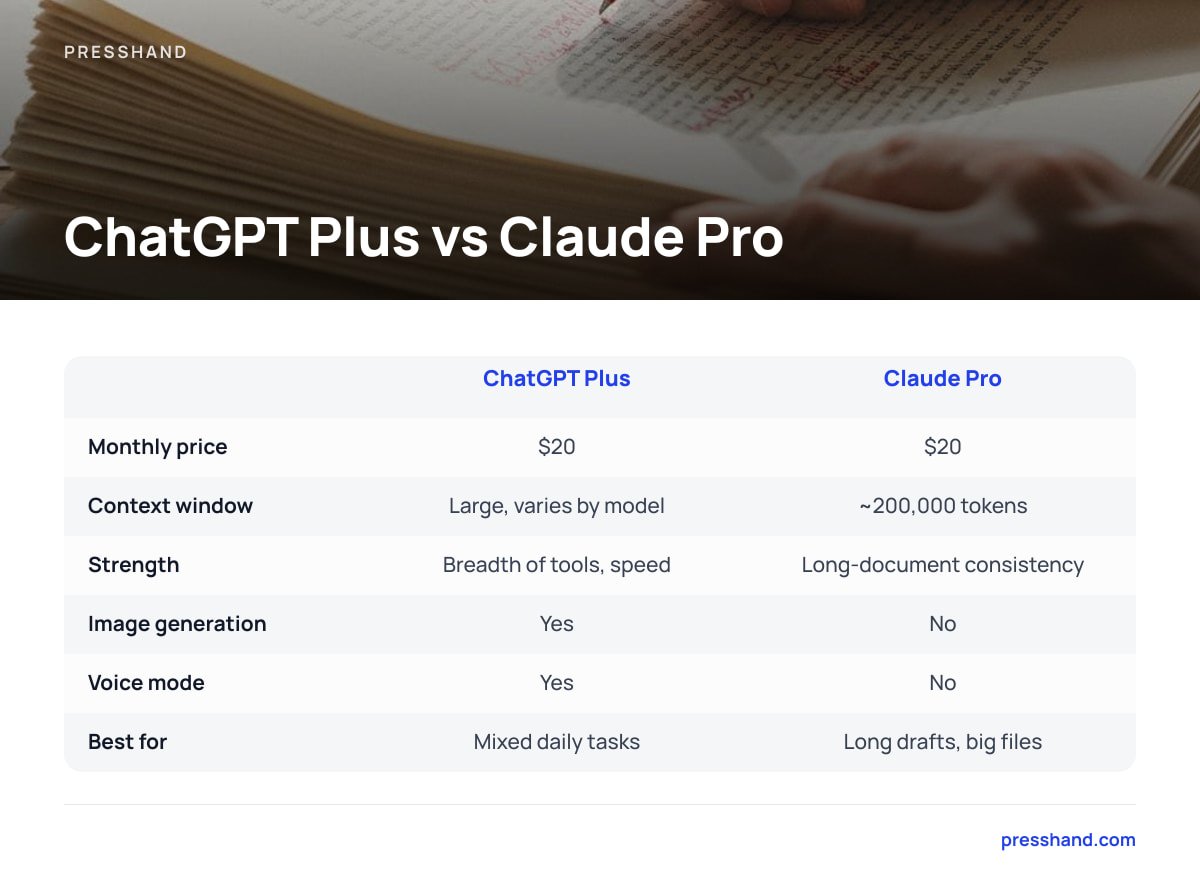
| ChatGPT Plus | Claude Pro | |
|---|---|---|
| Monthly price | $20 | $20 |
| Context window | Large, varies by model | ~200,000 tokens |
| Strength | Breadth of tools, speed | Long-document consistency |
| Image generation | Yes | No |
| Voice mode | Yes | No |
| Best for | Mixed daily tasks | Long drafts, big files |
Both companies publish their own current pricing — OpenAI's ChatGPT pricing page and Anthropic's Claude pricing page — and it's worth checking both before you commit, since plan details shift more often than the headline price. At the same $20, you're not choosing based on cost. You're choosing based on which failure mode annoys you less: ChatGPT occasionally drifting on long text, or Claude having fewer bells and whistles outside of writing and reasoning.
Data Privacy: What Happens to the Draft You Paste In
If you're pasting in client content, unpublished drafts, or anything under an NDA, this matters more than any feature comparison. OpenAI's enterprise privacy documentation states that data submitted through its business and API products isn't used to train models by default. Anthropic makes a similar commitment for its API and paid consumer products in its own privacy materials. Neither company publishes a blanket guarantee for every single product tier, though, so the right move is to check the specific plan you're actually on — the free tier of either tool often carries different terms than the paid one.
Pro Tip: If you manage content for clients, keep a one-line note in your contract specifying which AI tools you use and under which plan. It costs nothing to write and saves an awkward conversation later if a client asks where their draft content went.
Connecting Either Model to WordPress: Why the Tool Matters More Than the Model

Here's the part both comparisons usually skip: neither ChatGPT nor Claude can touch your WordPress site on its own. A model writing excellent copy in a chat window still has to be copied, pasted, formatted, and published by a human — unless something connects the two. That connection increasingly runs on the Model Context Protocol, an open standard Anthropic introduced that lets an AI model call real tools — reading a database, running a search, publishing a post — instead of just generating text about it. OpenAI's models support the same protocol through compatible clients, which means the "ChatGPT vs Claude" question for WordPress work isn't really about which model is smarter. It's about which one you've wired up to actually do something on your site.
This is the detail that makes the whole debate less dramatic than it sounds. Once a model can create a post, score a page's SEO, or swap a plugin setting through MCP, the quality gap between the two shrinks, because most WordPress admin tasks — writing a post, adjusting a meta title, resizing an image — don't stress-test the edges of either model's writing ability. They stress-test whether the connection works reliably.
Run Both Models on Every Site You Own, Without Per-Site Fees
This is the part where picking one model forever stops making sense. Presshand is a WordPress MCP client that runs on your own machine or server and connects either Claude or ChatGPT to every WordPress site you manage, so you can write posts, fix SEO, swap menus, manage plugins and images, or moderate comments just by asking in plain English — across 83 separate WordPress jobs, including live SEO scoring out of 100 that works alongside Yoast, Rank Math, All in One SEO, and SEOPress.
It's a one-time payment: $97 for every site you personally own, or $197 for the Agency licence if you want to rebrand it and resell it to clients. There's no per-site fee and no monthly cap either way. Updates are optional after the first year, at $49 if you want them, and the licence includes three months of the ReplaStats analytics add-on plus the WordPress plugin to keep. The honest caveat: Presshand is the connector, not the model — you still need a ChatGPT or Claude account behind it, so check which plan covers the context window your workload actually needs before you buy either.
Frequently Asked Questions
Can I use both ChatGPT and Claude on the same WordPress site?
Yes. Nothing about either model locks you into exclusive use, and a tool that connects both through the Model Context Protocol lets you switch per task — Claude for a long rewrite, ChatGPT for a quick fix.
Which is cheaper, ChatGPT or Claude?
Their main paid tiers both cost $20 a month, so price isn't the deciding factor. The real cost difference shows up in which model needs less editing or fewer retries for your specific tasks.
Does Claude or ChatGPT write better SEO content?
Claude tends to produce more consistently structured long-form drafts, which helps with full blog posts. ChatGPT is faster for short, specific SEO tasks like a single meta description or title tag rewrite.
Is content I paste into these models used for training?
Both OpenAI and Anthropic state that business and API-tier data isn't used for training by default, but free consumer tiers can carry different terms. Check the specific plan you're on before pasting in client or unpublished content.
Do I need coding knowledge to connect ChatGPT or Claude to WordPress?
No, not if you use a connector built for it. Tools built on the Model Context Protocol let you type plain-English instructions and have the model carry out the WordPress task directly, without writing code yourself.